Bricks Builder
Visual WordPress site building with responsive layouts, global styles, dynamic content and SEO tools for developers, designers and business owners.
Instant access Original unmodified files Free future updates
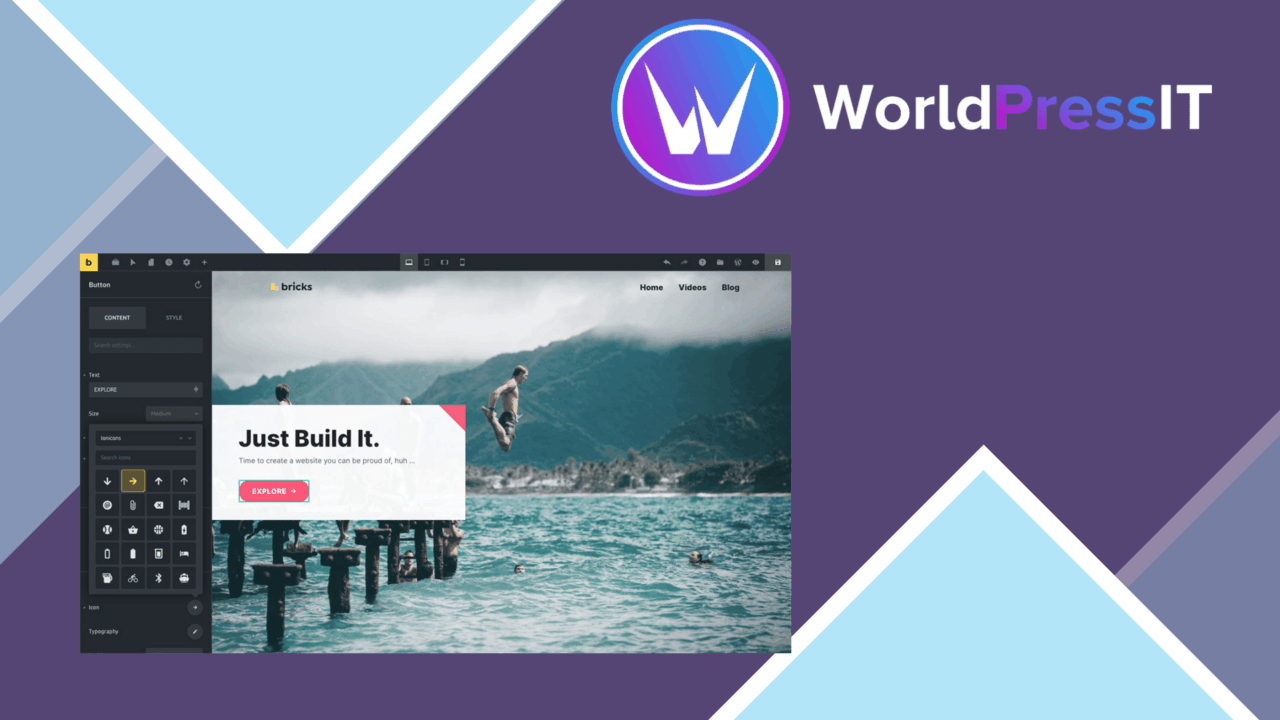
Bricks Builder is a visual WordPress site-building tool for people who want control over a site’s layout without writing every component by hand. Its focus is broad: the editor covers page structure, responsive presentation, global styling, dynamic content and search-oriented settings in one working environment. That makes it more than a page canvas; it is intended to shape the site from its overall framework down to individual sections.
Visual site building
The drag-and-drop interface is the centre of the product. It gives developers, designers and business owners a direct way to arrange page elements and adjust layouts while seeing the result in real time. That immediate feedback is useful when a design involves repeated spacing, changing section proportions or several responsive breakpoints, because the relationship between the setting and the rendered page stays visible during editing.
Pre-designed templates provide a starting point rather than forcing every page to begin as a blank layout. They suit projects that need a quicker first pass, while the editor and style controls leave room for a more individual result. The feature set is aimed at both visual composition and ongoing site-wide consistency.
Control beyond the page
Bricks Builder’s strongest distinction is the number of controls that sit above a single page. Global styles support consistent branding across the site, so colours, typography and other shared design choices do not need to be recreated separately for every layout. Responsive design options address the different demands of desktop, tablet and mobile presentation.
- Drag-and-drop layout editing for arranging site content visually.
- Responsive design options for adapting layouts across devices.
- Global styles for maintaining consistent branding throughout the site.
- Real-time editing that shows changes as they are made.
- Dynamic content support for more personalised page experiences.
- Integrations with popular WordPress plugins to extend the builder’s role.
Search and dynamic content
The built-in SEO tools give the builder a search-focused layer alongside its design controls. That is useful for teams that want content presentation and basic optimisation decisions close together rather than split across unrelated interfaces. Dynamic content adds another practical dimension, supporting pages that present changing or personalised information instead of relying only on fixed text and layouts.
These features make the product relevant to more than brochure-style pages. A site with reusable visual patterns, changing content and a defined brand system has a clearer reason to use a builder with global controls than one that only needs occasional text edits.
What to weigh
A visual builder introduces an extra design layer compared with working directly with a theme’s templates or writing page markup yourself. That is a reasonable trade for faster visual iteration, but code-first teams may prefer the directness of their existing workflow. The wider control set also brings more decisions: responsive settings need attention across device sizes, and global style changes require care because a shared adjustment affects the consistency of the wider site.
The SEO tools should be treated as part of the editing workflow, not as a promise of search rankings. Rankings still depend on the content and wider site work around the builder, and the supplied feature list does not describe the depth of those SEO controls. The same applies to integrations: support for popular WordPress plugins is stated, but the specific integrations are not identified.
Who it suits
Bricks Builder fits users who want to design an entire WordPress site visually while retaining control over responsive layouts and shared styling. It is particularly well matched to developers and designers handling several branded pages, as well as business owners who need a more guided alternative to coding each layout. Choose it for its combination of real-time editing, templates, dynamic content and site-wide controls; choose a simpler approach if the project needs only modest page adjustments or if direct template work is already the preferred method.
The verdict
Download Bricks Builder and see for yourself
You get the full Bricks Builder release (v2.3.7), ready to install, plus every update that follows. One click and it is yours.
Download Bricks Builder v2.3.7- Instant download
- Original developer files
- Updated 23 Sep 2026
Related reviews
Browse all
Toolset Layouts WordPress Layout Builder
Build custom WordPress page structures with drag-and-drop rows, reusable templates, responsive controls, and content-awa…
Advanced Themer for Bricks
Bricks Builder tools for creating branded layouts, dynamic content, responsive designs and reusable templates without re…
Otter Pro
Build Gutenberg pages with custom blocks, templates, responsive layouts, WooCommerce tools, visibility rules and AI-assi…