Divi Single Builder for MEC
Event page layouts, bookings and ticket-focused content arranged through Divi for Modern Events Calendar sites, with responsive output and shortcode placement.
Instant access Original unmodified files Free future updates
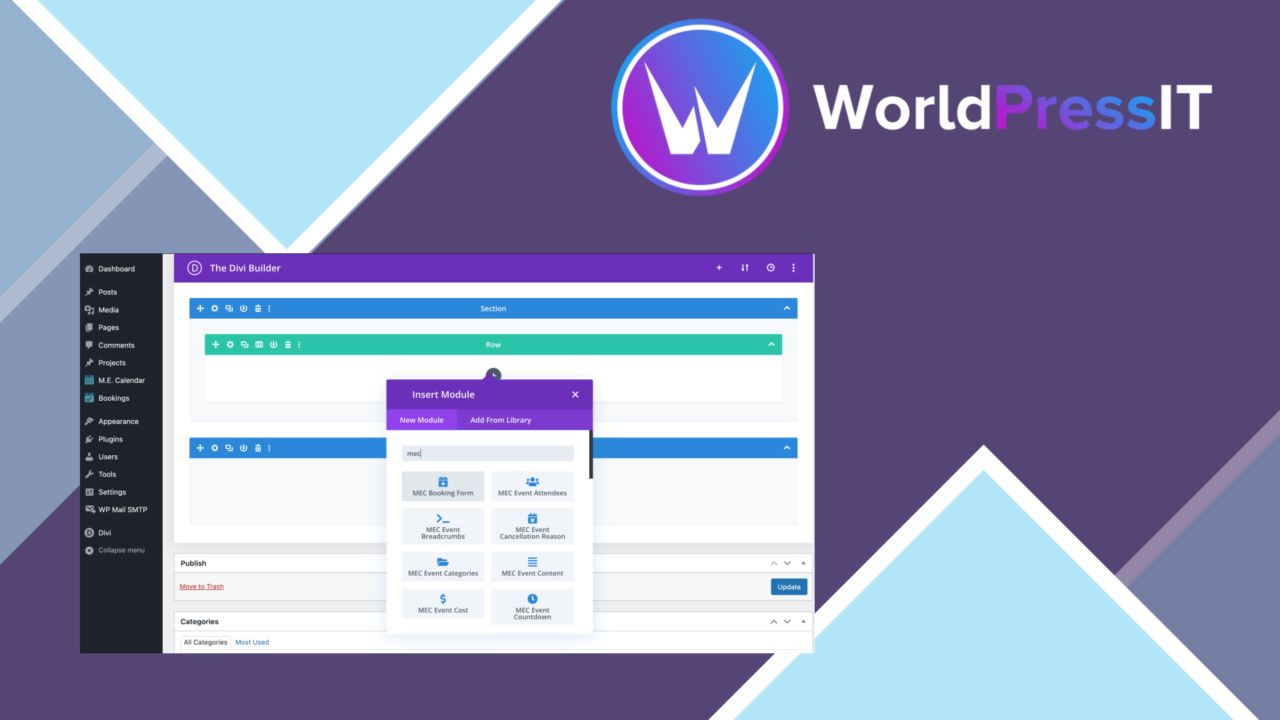
Divi Single Builder for MEC adds event-focused page building to the Divi and Modern Events Calendar combination. Its purpose is straightforward: give organisers, agencies and businesses a visual way to shape event pages rather than relying on a fixed presentation. The plugin also addresses the surrounding event workflow, with booking, ticket and RSVP features described alongside its layout tools.
A Divi layer for events
The plugin is built for sites already using Divi and Modern Events Calendar. That focus is useful because event information often needs more structure than a standard page: dates, booking details, ticket information and response options all need a clear place in the layout. Divi Single Builder for MEC brings those event elements into a drag-and-drop editing process, so the page arrangement follows the site’s existing design rather than standing apart as a separate calendar area.
This is a presentation tool first, but the feature list reaches beyond visual editing. The product describes support for bookings, ticket sales and RSVP management, giving an event page a path from information to registration. It also includes shortcode support, which provides a way to place event content in locations beyond the main builder layout.
Layout control
The main attraction is the ability to arrange event elements through Divi’s visual interface. That suits sites where the event page needs to follow an established brand system, such as a particular content order, colour treatment or promotional structure. A drag-and-drop workflow also makes it easier to change the emphasis of a page as an event develops, although the quality of the result still rests on the layout decisions made by the site owner.
- Custom event layouts inside the Divi Builder.
- Drag-and-drop arrangement of event elements.
- Responsive presentation for desktop, tablet and mobile screens.
- Shortcodes for embedding event content in other parts of a site.
- A built-in calendar view for tracking and managing events.
Bookings and calendars
Divi Single Builder for MEC is not limited to a single event template. Its advertised feature set includes ticket sales, RSVP management and payment gateway integration, which places booking activity alongside the page design work. The built-in calendar view adds an administrative overview for tracking events, while the responsive design keeps the public-facing information usable across screen sizes.
That combination is most relevant to organisations running several events or presenting detailed event pages under a consistent visual identity. Shortcode support is also practical for sites that need an event listing or selected event content inside another page structure. The documentation and support offering suggests that setup guidance is part of the product, though the supplied information does not detail the documentation’s scope.
What to weigh
The first trade-off is product dependence. This is a specialised add-on for Divi and Modern Events Calendar, not a general-purpose event builder. Sites using another theme, another page builder or a different calendar system will have little reason to choose it, and changing that underlying stack would reduce the value of the add-on.
The second trade-off is detail left unspecified. The feature list mentions payment gateway integration, ticket sales and RSVP management, but it does not identify the gateways, ticket rules or booking workflows included. That makes the broad feature list useful as a direction, rather than enough evidence for a particular registration process. Finally, visual freedom brings design work: a drag-and-drop editor gives control over placement, but a coherent event template still needs to be planned and maintained.
Who it suits
This plugin suits Divi sites that already use Modern Events Calendar and need branded event pages without abandoning the Divi editing model. It is a sensible fit for organisers and agencies that publish multiple events, need ticket or RSVP details on those pages, and want the same content available through shortcodes or a calendar view. It is less suitable for a site looking for an independent event system or a clearly documented list of supported payment services before making a decision.
The verdict
Download Divi Single Builder for MEC and see for yourself
You get the full Divi Single Builder for MEC release (v1.6.0), ready to install, plus every update that follows. One click and it is yours.
Download Divi Single Builder for MEC v1.6.0- Instant download
- Original developer files
- Updated 24 Sep 2026
Related reviews
Browse all
Jet Appointments Booking
Appointment scheduling for consultants, therapists, salons and other service businesses, with custom forms, availability…
Elementor Shortcode Designer for MEC
Build custom MEC event listings with Elementor, choosing grid, list or calendar layouts, event counts, maps and modal or…
MEC Waiting List
A Modern Events Calendar add-on that collects interest after sell-out, ranks waiting attendees, and moves them into avai…