Firebox Pro
Create lightboxes, slide-ins and notification bars with a visual editor, behaviour-based targeting, email integrations and conversion reporting for WordPress.
Instant access Original unmodified files Free future updates
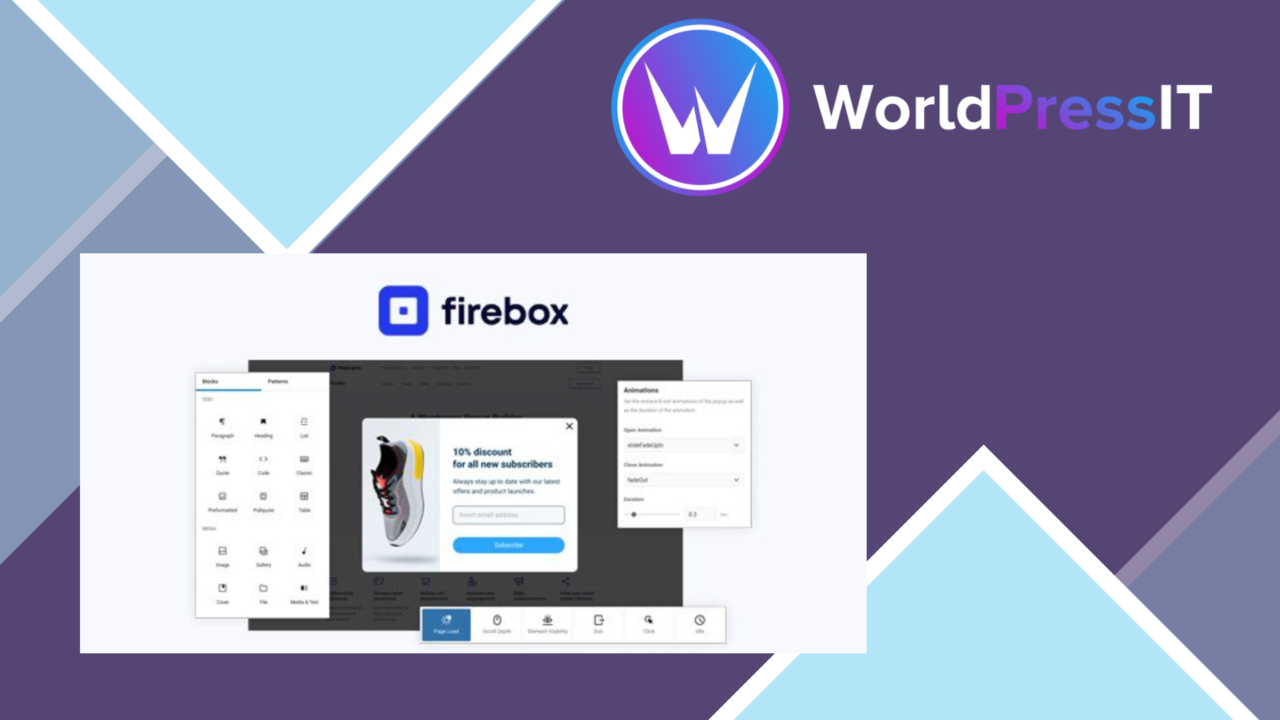
Popup creation is the centre of Firebox Pro, with tools for building attention-focused messages without writing the layout from scratch. The plugin combines a drag-and-drop editor with several presentation formats, targeting controls and conversion reporting, giving site owners a single place to plan and manage visitor prompts.
Popup building
The editor is designed for users who want to customise a popup visually. Templates provide a starting point for a site’s branding, while responsive design keeps the presentation suitable for different screen sizes. That combination should cover common jobs such as lead capture, promotional messages, feedback requests and announcements without requiring a separate tool for each format.
Firebox Pro supports more than the conventional centred lightbox. Its available formats include:
- Lightbox popups for prominent messages over page content.
- Slide-in popups for a less central placement.
- Notification bars for compact announcements across the page.
- Customisable templates for matching colours and styling to the site.
Ways to engage
The feature set is broad enough for several visitor-facing tasks. A business can use a popup to collect leads, an online shop can promote an offer, and a publisher can present an announcement or request feedback. The vendor also describes interactive content such as quizzes and surveys, which gives the builder a role beyond simple email forms.
Email marketing integrations connect popup-based lead generation with external services. The listing does not name the supported services, so this is an area to confirm before choosing Firebox Pro for a particular email workflow.
Targeting and reporting
Advanced targeting options are intended to show messages according to user behaviour rather than displaying the same prompt to every visitor. Exit-intent technology adds a specific trigger for visitors who are about to leave, making it suitable for a final offer, subscription prompt or feedback request.
An analytics dashboard tracks popup performance and conversions. That gives site owners a place to review how individual messages perform, although the listing does not explain which metrics, reports or comparison tools are included. The practical value of this area therefore rests on how much detail the dashboard exposes for each popup.
What to weigh
Popups interrupt the visitor’s reading or shopping flow by design. Behaviour-based targeting and exit intent provide ways to choose the moment, but they do not remove the need for careful message frequency and placement. A poorly planned campaign can still feel intrusive, even when the presentation is attractive.
The drag-and-drop approach also brings a configuration trade-off. Multiple formats, templates, targeting rules and responsive layouts offer flexibility, but they create more decisions than a single announcement tool. Teams wanting a very small number of basic notices could find the wider builder more than they need. The unspecified email service list and analytics detail are further points to verify before building a workflow around those features.
Who it suits
Firebox Pro fits WordPress site owners who need several types of visitor prompt and prefer to manage them through a visual builder. It is especially relevant to sites combining lead generation, promotions, announcements and behavioural targeting. Its feature set is less compelling for anyone seeking only a minimal banner or a highly documented reporting system, but it offers a practical collection of popup formats in one plugin.
The verdict
Download Firebox Pro and see for yourself
You get the full Firebox Pro release (v3.1.14), ready to install, plus every update that follows. One click and it is yours.
Download Firebox Pro v3.1.14- Instant download
- Original developer files
- Updated 25 Oct 2026
Related reviews
Browse all
Affiliate Forms
Affiliate registration and campaign forms for Ninja Forms, with click, conversion and earnings tracking to help manage a…
Brave Popup Builder PRO
Create targeted WordPress popups with visual editing, timed and behavioural triggers, email integrations, A/B testing an…

MailChimp for WooCommerce Memberships
Connect WooCommerce memberships and subscriptions to MailChimp for member segmentation, targeted campaigns, opt-in forms…