WPC Product Table for WooCommerce
Build WooCommerce rapid order forms with filterable product tables, custom columns, sorting and responsive layouts for shoppers comparing products across desktop and mobile.
Instant access Original unmodified files Free future updates
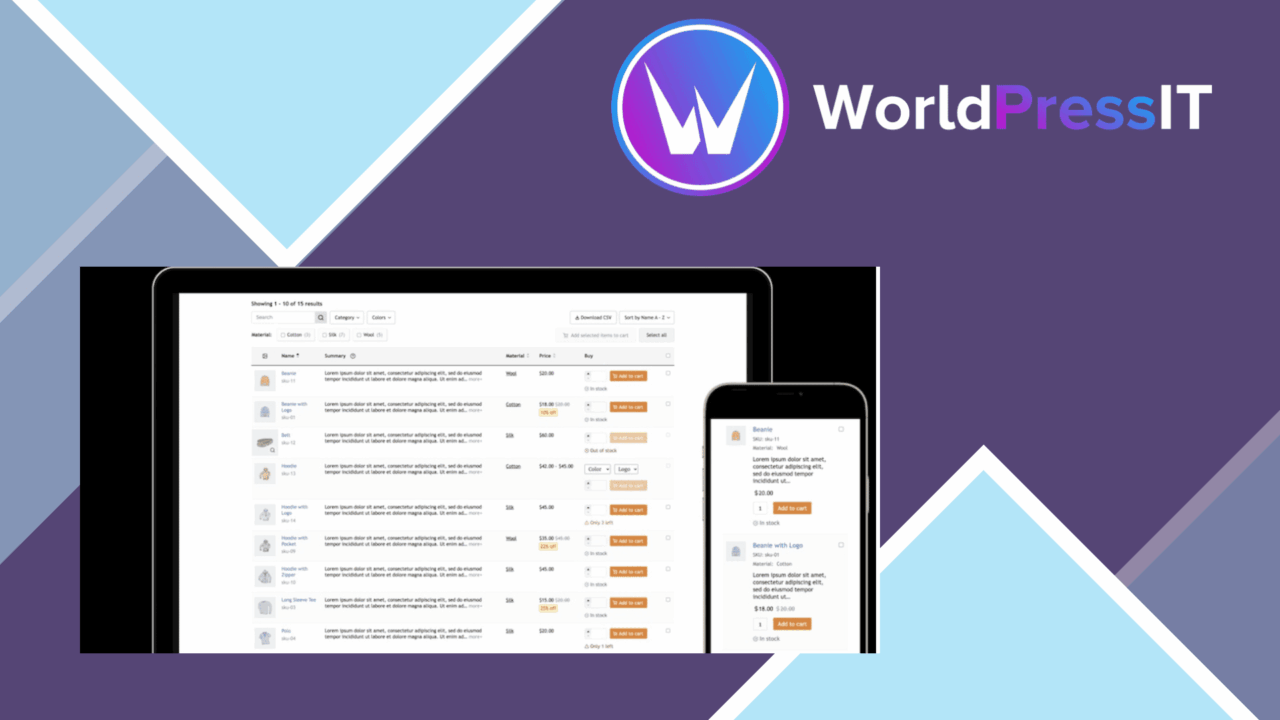
WooCommerce stores with sizeable or closely related catalogues often need something more practical than a long sequence of product cards. WPC Product Table for WooCommerce presents products in structured tables, giving shoppers a compact view of key details and a faster route through a rapid order form. It is aimed at stores where comparison, filtering and quick selection matter more than giving every product a large standalone presentation.
Product tables at the centre
The plugin’s main job is to turn WooCommerce products into configurable listings that are easier to scan. A table can show several products together and expose useful purchasing information in the same view. That arrangement suits wholesale-style catalogues, parts stores, food menus and other shops where customers already know what they are looking for or need to compare similar items before choosing.
Setup is based around shortcodes, so a table can be placed on a page or post without building a separate catalogue template. The vendor describes the implementation as straightforward, while the available display settings provide room to match the table to the store’s content rather than presenting every catalogue in one fixed format.
Filtering and sorting
Product discovery is the strongest part of the feature set. Shoppers can narrow listings by category, tag or product attribute, then sort the remaining results by price, popularity or other available criteria. That combination gives a large catalogue two useful paths: a customer can start with a broad product group and refine it, or sort directly when price or popularity is the deciding factor.
- Filter products by categories, tags and attributes.
- Sort listings by price, popularity and other criteria.
- Show product information in grid or list layouts.
- Add columns for details such as SKU and stock status.
- Place tables on pages and posts with shortcodes.
These controls are especially relevant to rapid order forms, where customers need to move through a set of products without opening each item in turn. The result is a more information-dense shopping path than a conventional product archive.
Columns and layouts
Custom columns let a store decide which product facts deserve space in the table. SKU and stock status are named examples, but the broader value is the ability to expose information that a particular catalogue needs. A list layout favours compact comparison, while a grid layout gives each item a more visual treatment. The choice lets the same product data serve different page designs.
Responsive behaviour is also part of the design. The tables are intended to adapt across desktop and mobile screen sizes, which matters for a format that can otherwise become difficult to read on narrow displays. WooCommerce integration keeps the table connected to the store’s existing products and settings rather than requiring a separate product inventory.
What to weigh
Dense tables require editorial judgement. Adding SKU, stock, attributes and other fields gives shoppers more context, but too many columns can make a listing harder to scan, particularly on a small screen. Responsive behaviour helps the layout adapt; it does not remove the need to choose a sensible set of fields for each table.
Filtering is only as useful as the catalogue structure behind it. Stores need consistent categories, tags and attributes for those controls to produce clear results. A second trade-off is that a table favours comparison and rapid selection over rich product storytelling, so it is less suitable as the only presentation for products that rely on long descriptions or large visual galleries.
Who it suits
WPC Product Table for WooCommerce fits shops that want customers to compare many products in one place, especially when SKU, availability or attribute information affects the buying decision. It is a practical choice for catalogue pages, order-oriented layouts and product groups that benefit from sorting and filtering.
It is less compelling for a small, highly visual shop where each product deserves its own presentation and there is little value in tabular comparison. For the right catalogue, though, the combination of custom columns, taxonomy filters, sorting, responsive layouts and shortcode placement addresses a clear WooCommerce display problem without changing the underlying product data.
The verdict
Download WPC Product Table for WooCommerce and see for yourself
You get the full WPC Product Table for WooCommerce release (v3.2.0), ready to install, plus every update that follows. One click and it is yours.
Download WPC Product Table for WooCommerce v3.2.0- Instant download
- Original developer files
- Updated 26 Sep 2026
Related reviews
Browse all
WooCommerce Elavon Converge Payment Gateway
Process card, eCheck and other Elavon payments through WooCommerce, with tokenized records, multi-currency support and o…

Aelia Tax Display by Country for WooCommerce
Country-aware WooCommerce tax display using IP geolocation, with support for multiple tax classes and configurable prici…

GetPaid Multi-Currency
Multi-currency pricing for WordPress stores, with location-based detection, automatic exchange-rate updates, payment gat…