WP Adminify Premium
Customise the WordPress admin with dashboard widgets, menu controls, role management, login branding and tools for a more focused editorial workspace.
Instant access Original unmodified files Free future updates
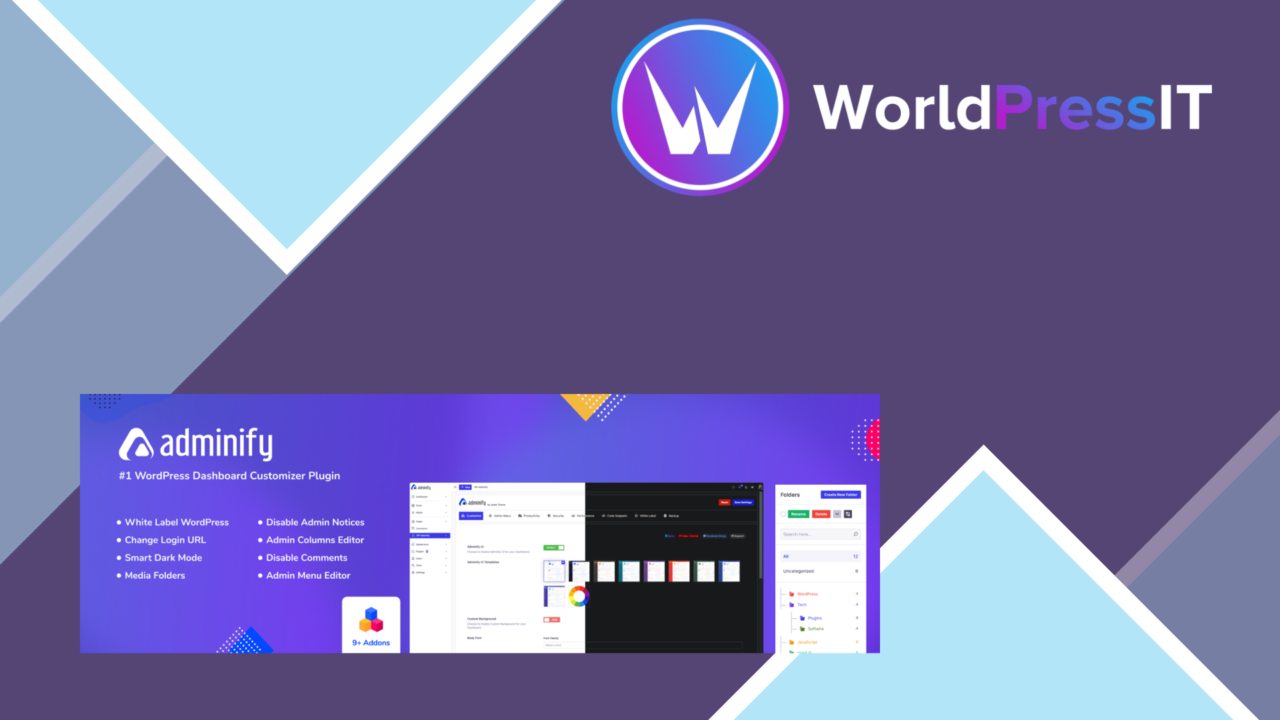
WP Adminify Premium focuses on the part of WordPress that visitors rarely see but administrators use every day: the dashboard and its surrounding controls. It brings dashboard personalisation, menu editing, role management, colour schemes, login branding, maintenance mode and performance tools into one administrative toolkit. That broad scope suits site owners who want to shape the back end around a particular workflow rather than accept the default WordPress arrangement.
Control the dashboard
The central feature is a customisable admin dashboard. Widgets and shortcuts can be arranged around the tasks that matter to a particular site, giving an editor, developer or owner a more relevant starting point after signing in. This is a practical distinction from changing the front end: the work area itself becomes the object of customisation.
Admin colour schemes provide another layer of control over the interface. They are useful for separating client sites, applying an organisation’s preferred visual treatment or simply making the dashboard easier to recognise. Menu editing adds structural control, allowing the navigation to reflect the tools a user actually needs instead of presenting every available item at once.
Tools for site management
WP Adminify Premium extends beyond appearance. Its user role management features support the creation and adjustment of roles with specific permissions, which gives administrators a way to match access to defined responsibilities. That is relevant on sites where content editors, developers and owners should not all work with the same controls.
- Dashboard widgets and shortcuts for a tailored administrative starting point.
- Menu editing to organise or simplify the WordPress navigation.
- Custom user roles with specific permissions.
- Admin colour schemes for a more recognisable back-end interface.
- Maintenance mode for communicating that site work is in progress.
- Login customisation with branded logos and background images.
- Activity logs and two-factor authentication options among its security features.
- Performance optimisation tools intended to support a faster site.
Branding beyond login
Login customisation gives the sign-in screen a branded presentation through logos and background images. Combined with admin colour schemes and dashboard controls, this makes the administrative experience feel more deliberate for teams or client-facing projects. Maintenance mode addresses a different moment in the site’s lifecycle: while changes are under way, visitors receive a notice rather than encountering an unfinished page.
The activity log and two-factor authentication options also place the plugin in the wider site-management category, not just the visual-customisation category. Those controls are relevant to administrators who want a clearer record of activity and an additional sign-in safeguard, although they still need to be configured as part of the site’s wider security practice.
What to weigh
The breadth of the feature set is also the first trade-off. Dashboard layout, menus, roles, login presentation, maintenance mode and security controls all introduce decisions into the administrative layer. A small site with one administrator could find that range more involved than its day-to-day work requires.
Role management and authentication options demand careful permission choices. A badly planned role is an access problem, not merely a cosmetic inconvenience, so the plugin is better suited to an administrator willing to document who should see which controls. The performance tools are another area to assess against the site’s existing optimisation setup; their presence does not remove the need to understand the rest of the stack.
Who it suits
WP Adminify Premium is aimed at developers, site owners and teams that spend substantial time inside WordPress administration. It has a clear case on multi-user sites where menus, roles and shortcuts need to reflect different responsibilities, and on branded projects where the login and dashboard should follow a consistent presentation.
For a single-user blog that rarely needs administrative changes, its strongest features may go unused. For a managed site with several editors, a client-specific back end or a need to combine interface changes with role and security controls, the all-in-one approach is more persuasive. The decision comes down to how much control the admin area needs, and how carefully that control will be maintained.
The verdict
Download WP Adminify Premium and see for yourself
You get the full WP Adminify Premium release (v4.3.1), ready to install, plus every update that follows. One click and it is yours.
Download WP Adminify Premium v4.3.1- Instant download
- Original developer files
- Updated 12 Oct 2026
Related reviews
Browse all
OceanWP Extra
Adds OceanWP-focused controls for headers, footers, demos, typography and WooCommerce, giving site owners a broader cust…
Give Funds and Designations
Donation funds and designations let supporters direct gifts to specific causes while giving organisations clearer report…
WP All Export Pro Premium
Exports WordPress content, custom fields, taxonomies, and WooCommerce data to CSV, XML, or Excel for analysis, migration…