Media File Renamer Pro
Rename WordPress media files in bulk or during upload, using metadata and custom rules to keep filenames organised and more useful for SEO.
Instant access Original unmodified files Free future updates
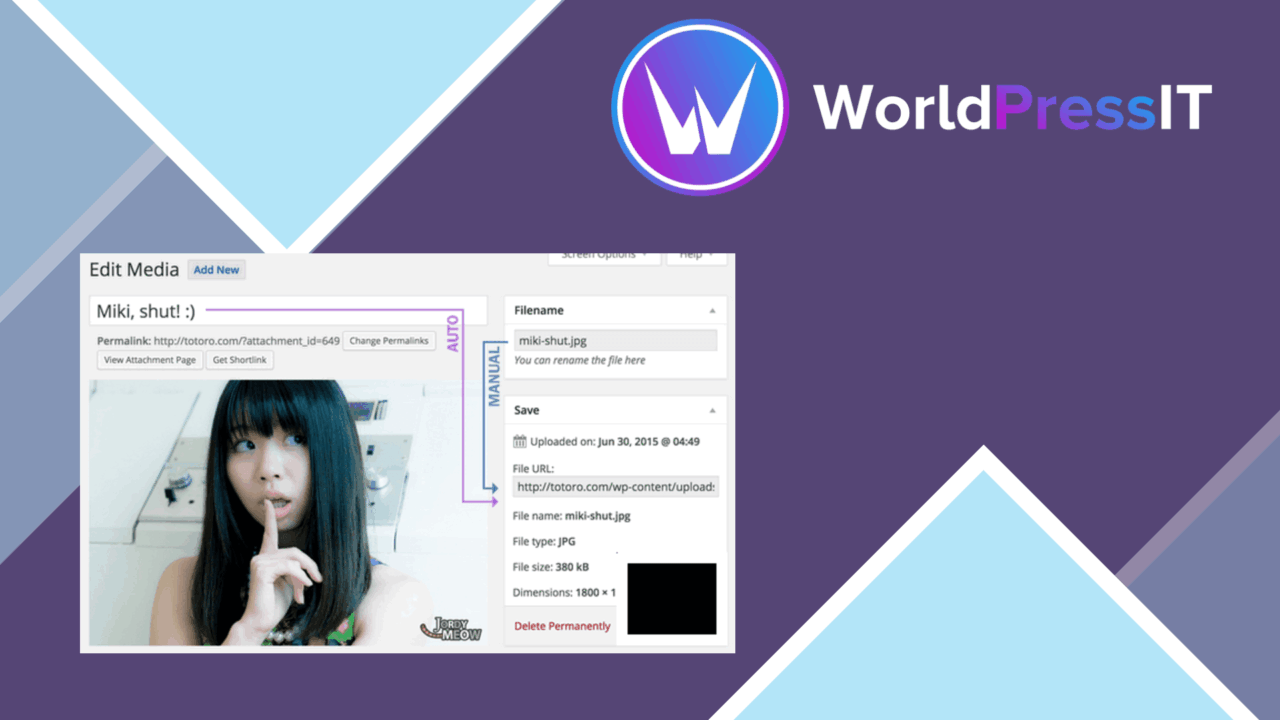
Media File Renamer Pro focuses on a small WordPress problem with wide practical consequences: media libraries often accumulate filenames that say little about their contents. The plugin provides manual and automatic renaming, with the stated aim of improving organisation and making filenames more descriptive for search engines. It also updates references to those filenames across the website, so a rename is not limited to changing a label in the Media Library.
File naming problem
The strongest case for this plugin is a site with years of uploaded images, videos, or audio files named by a camera, operating system, or hurried editor. A consistent filename gives the media library a clearer filing system and makes individual assets easier to identify later. For sites where media is published frequently, automatic naming during upload helps prevent the library from drifting back into inconsistent patterns.
This is not presented as a complete SEO system. Its contribution is narrower and more tangible: it helps produce filenames that are descriptive and relevant, while its integrations with WordPress SEO plugins connect that work to a broader optimisation setup. That makes it most useful as part of an existing publishing routine rather than as a replacement for one.
Rules and previews
Renaming does not have to be a one-file-at-a-time job. The feature set covers bulk changes based on custom patterns or metadata, giving administrators a way to apply a naming convention across a collection. Advanced users also get configurable renaming rules and developer-oriented automation options for controlling how the process is performed.
- Bulk renaming based on custom patterns or metadata.
- Automatic renaming during file uploads.
- A preview of new filenames before changes are applied.
- Options to revert to original filenames.
- Support for images, videos, and audio files.
- Integration with popular WordPress SEO plugins.
The preview is an important part of that workflow. It gives an editor a chance to inspect the proposed result before applying a batch, while the revert option provides a route back if a naming rule produces an unwanted outcome.
Media library workflow
The plugin’s range is broader than image housekeeping. Support for video and audio files makes the same naming policy available across a mixed media library, rather than limiting it to the image uploads that usually receive the most attention. WooCommerce is also identified as compatible, which suits stores that need product media kept in order alongside regular site assets.
Manual control and upload-time automation serve different publishing habits. A site undergoing a cleanup benefits from bulk operations and previews; a site with a strict editorial process benefits from applying its rules as files arrive. The ability to define patterns and metadata-based behaviour gives both groups a more precise starting point than ad hoc renaming in the media editor.
Where it falls short
Renaming files is a structural change, not merely a cosmetic edit. Although the plugin updates filename references on the website, administrators still need to review proposed bulk changes carefully, particularly on a site with complicated media relationships or naming requirements. The preview and revert features reduce the risk, but they do not remove the need for a clear convention before automation is enabled.
The second trade-off is complexity. Custom rules and developer automation provide control, yet they add decisions that a small site may not need. Automatic naming is convenient only after the desired pattern has been worked out, and a broad media-type feature list does not amount to a specialist workflow for every kind of asset. Finally, better filenames support SEO housekeeping but do not by themselves cover the rest of an SEO strategy.
Who it suits
Media File Renamer Pro suits administrators cleaning up an established library, publishers who want consistent names on every new upload, and developers who need rule-based control over renaming. It is especially relevant where images, video, and audio share one WordPress installation or where product media needs a consistent naming policy. Sites with only a few carefully managed files may find its advanced controls unnecessary, but larger or less orderly libraries have a clearer reason to use them.
The verdict
Download Media File Renamer Pro and see for yourself
You get the full Media File Renamer Pro release (v6.3.0), ready to install, plus every update that follows. One click and it is yours.
Download Media File Renamer Pro v6.3.0- Instant download
- Original developer files
- Updated 27 Sep 2026
Related reviews
Browse all
Essential Grid
Build responsive grids for posts, media, products and custom content, with masonry, carousel, filtering and visual styli…
EmbedPress Pro
Bring videos, documents, maps, audio and images into WordPress through one editor-friendly embedding tool, with responsi…

WP Media folder Addon
Organise images, videos, and documents into custom folders inside the WordPress media library, with drag-and-drop handli…