Meta Box AIO
Create custom fields and meta boxes for posts, taxonomies and user profiles, with visual controls for managing structured WordPress content.
Instant access Original unmodified files Free future updates
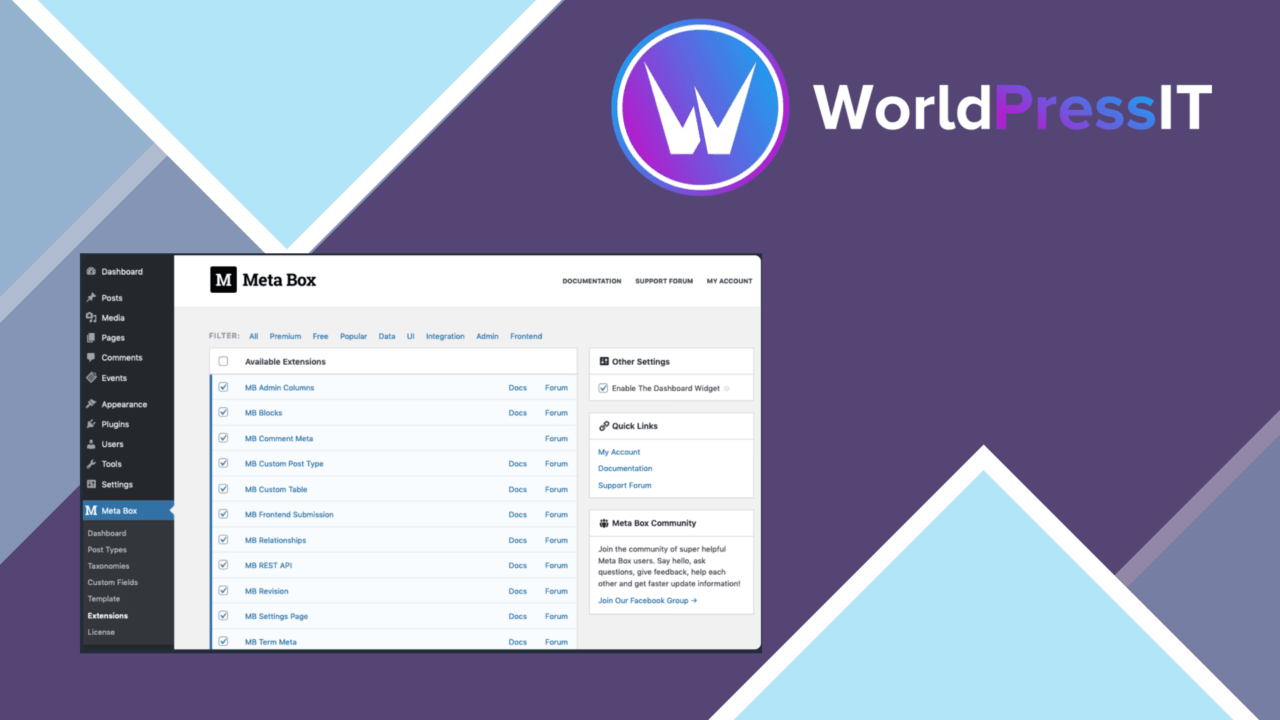
A single plugin for custom fields and meta boxes, Meta Box AIO brings the wider Meta Box extension set into one administration tool. Its purpose is practical: give site owners and developers a way to add structured information to WordPress content without building every field interface from scratch.
One plugin, many extensions
Meta Box AIO is aimed at sites that need more than the standard title, editor, image and excerpt fields. It supports custom fields for posts, pages and custom post types, while also covering taxonomies and user profiles. That range makes it suitable for projects where the content model extends across several parts of WordPress rather than living only inside the post editor.
The all-in-one approach also keeps the extension list more compact. Instead of assembling separate tools for each area, the product places the available extensions under one plugin. That is useful for administrators who want a single place to manage field-related functionality, although the breadth of the package means the interface represents a larger set of choices than a narrowly focused field editor.
Building structured content
The drag-and-drop interface is the clearest practical feature. It gives users a visual route for creating custom fields and meta boxes, reducing the need to define every field through code. The supported field types cover common content requirements, including text, images and checkboxes, with additional types available within the wider field system described by the vendor.
- Text fields for additional post or profile information.
- Image fields for attaching visual content to structured records.
- Checkboxes for boolean choices and editorial settings.
- Conditional logic for showing or hiding fields according to user input.
- Custom field groups for custom post types, taxonomies and user profiles.
Conditional logic is particularly useful for keeping an editing screen focused. A form that reveals related fields only after a relevant choice is made is easier to navigate than one that displays every possible setting at once. The value here rests on how carefully the fields are planned: the interface helps organise the form, but it does not replace decisions about which data belongs together.
Connections beyond core WordPress
Meta Box AIO also lists integration with Elementor and Beaver Builder. That gives custom field data a route into page-building workflows, so structured information does not have to remain visible only in the WordPress editing screen. For a site using either builder, this connection is relevant when templates need to work with fields created in the admin.
Customisable field settings add another layer of control over the editing experience and data management. Combined with the support for post types, taxonomies and users, the feature set is broad enough for directories, editorial systems, profile-driven sites and other content models that need more than a flat page editor.
Where it falls short
The main trade-off is breadth. An all-in-one package containing the full extension set presents more configuration surface than a small plugin dedicated to one field type or one content area. Teams wanting only a few basic fields may find the wider toolset harder to assess and maintain than a focused alternative.
The visual interface also does not remove the need for technical planning. Custom fields still need sensible names, field groups and display locations, and the vendor copy does not explain the depth of the Elementor or Beaver Builder integrations. Conditional logic improves the form once configured, but complex content models still require careful decisions about dependencies and data structure.
Who it suits
Meta Box AIO makes the most sense for developers and site owners building structured WordPress content across several object types. It is a good fit when one project needs custom fields for posts, taxonomies and user profiles, or when an editing workflow benefits from conditional sections and visual field management.
Sites with a simple handful of extra text fields may not need an extension set this broad. For everyone else, the combination of drag-and-drop creation, varied field types and page-builder connections provides a coherent starting point for turning WordPress into a more structured content system.
The verdict
Download Meta Box AIO and see for yourself
You get the full Meta Box AIO release (v3.13.0), ready to install, plus every update that follows. One click and it is yours.
Download Meta Box AIO v3.13.0- Instant download
- Original developer files
- Updated 20 Oct 2026
Related reviews
Browse all
WP Toolset Views
Build custom WordPress content displays with visual layouts, database queries, fields, templates, and front-end filterin…
Easy Digital Downloads Software Licensing
It creates and manages licence keys for digital products, with activation, expiry tracking, renewal reminders and usage…
AffiliateWP REST API Extended
Adds create, update and delete API operations to AffiliateWP, connecting affiliate, referral and visit data with externa…