Wicked Folders Pro Plugin
Custom folders organise WordPress media and other admin content, with drag-and-drop handling, search, bulk uploads and role-based folder access.
Instant access Original unmodified files Free future updates
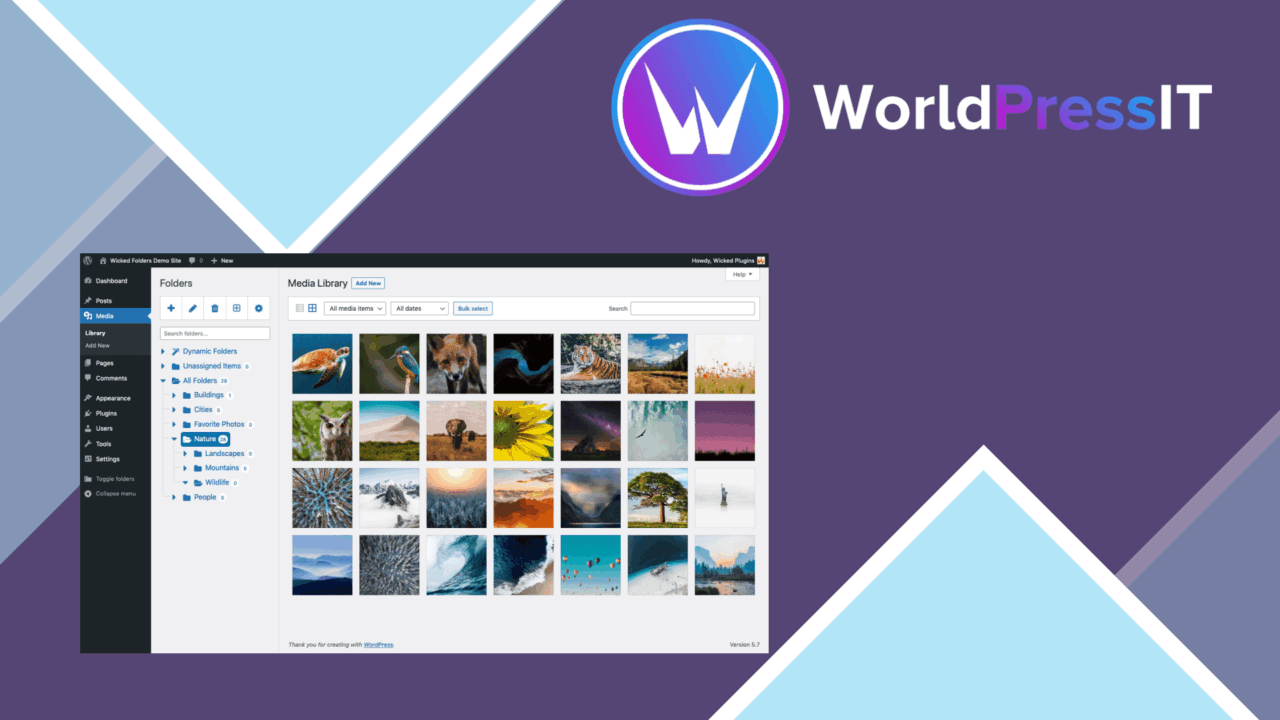
Custom folders give WordPress content a clearer home than a single chronological media list. Wicked Folders Pro Plugin adds that organisation inside the familiar WordPress admin, with support for media files and a wider set of content types. It is aimed at site owners, bloggers and developers who spend enough time managing assets for folder structure to matter.
Folders in the media library
The central feature is an unlimited set of custom folders for media files. Drag-and-drop handling keeps routine filing work direct: select an item, move it to the relevant folder and continue working in the library. Bulk uploads into designated folders are useful when adding a group of related images rather than sorting each file individually.
Search adds a second route to the same content. Folders provide a visible structure for browsing, while search helps locate a known file without stepping through the whole library. Custom folder icons add a small but practical visual cue, particularly when a site has separate collections for campaigns, editorial images, downloads or client materials.
More than media
The product is not limited to image organisation. The vendor lists pages, posts, custom post types, users, plugins, WooCommerce orders, products and coupons among the areas it can organise. That broad scope gives the folder system a role in general WordPress administration, not only asset management.
This is especially relevant to sites where the admin area contains several kinds of repeatable records. A developer handling custom post types, an editor sorting posts, or a shop manager separating products and coupons gets the same basic idea: group related records into folders instead of relying only on lists and search fields. The default WordPress media library remains part of the workflow, so the feature sits alongside the existing library rather than asking users to replace it.
Access and compatibility
Folder access can be assigned to specific user roles. That gives administrators a way to present different folder areas to different kinds of users, which is more useful than a private filing system only one person can see. It also suits sites with separate editorial, development and shop-management responsibilities.
Compatibility is another stated focus. Wicked Folders Pro is described as working with popular page builders and themes, with Elementor named among the compatible tools in the supplied product information. The practical benefit is keeping media used in page-builder layouts within the same organisational approach as the rest of the site.
Where it falls short
The folder system introduces another layer of organisation alongside WordPress’s existing lists, filters and media library. That is helpful once a folder convention is established, but it also creates a maintenance task: folders need sensible names, files need consistent placement and users need to agree where each item belongs.
Role-based folder access adds control, but it also adds administration. Someone has to decide which roles see which folders and keep those choices aligned with the site’s editorial process. The feature list also describes compatibility with page builders and themes without specifying the exact integrations or any limits, so teams with unusual custom post types or complex permissions should treat compatibility as something to verify against their own setup.
Who should use it
Wicked Folders Pro suits WordPress sites whose media library has outgrown a simple upload history, as well as installations managing many posts, pages, custom records or WooCommerce entries. Its strongest case is a content-heavy admin where repeated browsing, bulk filing and role-specific access are everyday tasks.
It is less compelling for a small site with a short media list and one administrator. In that situation, folders, icons and access rules add structure that might not repay the extra upkeep. For larger editorial and shop workflows, the combination of drag-and-drop filing, search, bulk uploads and broad content support presents a focused way to make WordPress administration more orderly.
The verdict
Download Wicked Folders Pro Plugin and see for yourself
You get the full Wicked Folders Pro Plugin release (v4.1.4), ready to install, plus every update that follows. One click and it is yours.
Download Wicked Folders Pro Plugin v4.1.4- Instant download
- Original developer files
- Updated 4 Oct 2026
Related reviews
Browse all
GetPaid Digital Downloads
Sell eBooks, software, and music from WordPress with file delivery, payment gateways, discount codes, customer records,…

Super Speedy Filters
Configurable AJAX filters help visitors narrow posts, products and other content through checkboxes, dropdowns and slide…
pentest-upload
A WordPress upload-related listing with no documented feature set, compatibility information or stated use case, so its…